
What is the difference between Gemini and Gemini live?
Curious about Gemini vs. Gemini Live? Explore their features and find out which one is right for you! Get all the details here.

Gemini vs Gemini Live: The Difference That Matters
You might type a carefully worded question into Gemini at your desk, then later speak naturally to Gemini Live while walking or pointing your phone’s camera at an object. Both experiences use Google’s AI, yet they feel very different.
The short answer is simple: Google Gemini is the broader AI assistant, while Gemini Live is its real-time voice conversation mode. They are connected features, not separate AI products. Gemini works on the web and mobile, while Live is mainly built for mobile use. Device, region, language, and account access can affect what you see. For wider context, explore these free Google AI tools.
What Is the Difference Between Gemini and Gemini Live?
Google Gemini is the main generative AI assistant available through the Gemini app and gemini.google.com. You can use it to answer questions, draft writing, summarize material, compare information, analyze uploaded files, and interpret images.
Gemini can also help with research, planning, coding, and everyday questions. A typed chat keeps your prompts and responses visible, which makes it easier to revise wording or return to earlier details.
Gemini Live is a voice-first feature within the Gemini mobile app. Instead of exchanging messages line by line, you hold a natural spoken conversation. You can ask a follow-up, change direction, or interrupt a response without starting over.
A useful Google Gemini AI assistant comparison comes down to scope versus interaction. Gemini is the assistant and its model-powered capabilities. Gemini Live is one way to talk with that assistant.
Gemini can read an answer aloud in some situations, but read-aloud is not the same as Live. Live is built around an ongoing conversation with turn-taking and spoken replies. That distinction makes Gemini Live explained for beginners much less confusing.
How does Gemini Live work during a voice conversation?
Open the Gemini app, select Live when it is available, choose a voice if prompted, and start speaking. Gemini responds aloud, and you can answer in the middle of its response or move to a new topic.
Its low-latency rhythm feels closer to a conversation than a voice command. You can pause, resume later, or ask a short follow-up without repeating the full context.
Newer Gemini Live voice conversation features can include camera sharing and screen sharing. That lets you ask about a document, a screen, an object, or a nearby scene. Voices, languages, background access, and visual tools vary by device and rollout. A practical Gemini Live hands-free guide can help you get started.
### What is Google Gemini best at when you use text?

Text mode works best when accuracy of wording matters. It is often the better choice for drafting emails, editing paragraphs, organizing notes, comparing options, reviewing files, or saving a written answer for later.
For example, Gemini can help summarize a long email thread or shape a professional reply. Learn more about Gemini in Gmail features if email is a regular part of your workflow.
Spreadsheets also benefit from visible prompts and results. A practical guide to Gemini in Google Sheets shows where AI can fit into tabular work. Text Gemini is usually stronger for long, organized output that you need to copy, edit, or check.
Gemini vs Gemini Live: Key Differences and Features Comparison Table
The Gemini and Gemini Live differences are easier to see side by side.
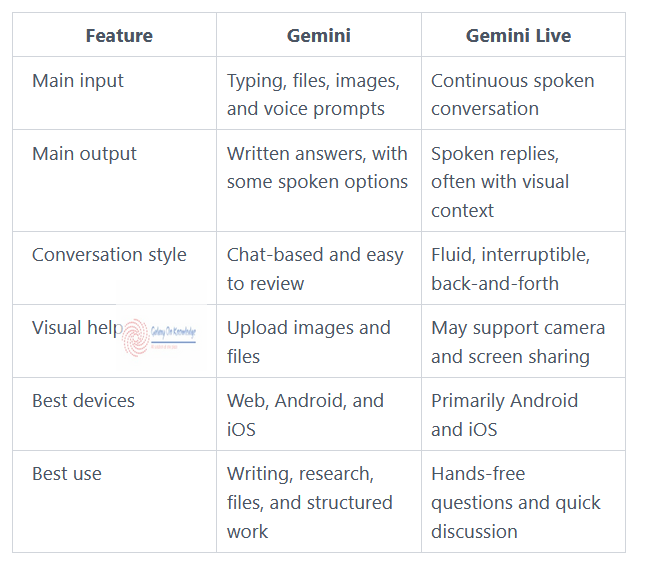
This Gemini vs Gemini Live comparison is about how you interact, not which option has a smarter label. Google Gemini commonly works on the web and in mobile apps. Gemini Live is designed mainly for mobile, while web access can be limited or change over time.
Google Gemini vs Gemini Live also differs in pace. Live supports spoken replies, interruptions, and a more natural rhythm. However, both can rely on cloud processing, so check your privacy settings, account requirements, and regional availability before sharing sensitive material.
Gemini Live for Android, iPhone, and web: where each option fits
Gemini Live for Android often provides the fullest mobile experience. iPhone users can access Gemini through Google’s apps, though features may arrive on a different schedule.
The web version is better for lengthy prompts, file work, and detailed written results. Camera sharing, screen sharing, voices, and background conversations can change after app updates.
Is Gemini Live better than Gemini? It is better for hands-free conversation. Standard Gemini is usually better for focused text work.
Gemini Live vs ChatGPT voice mode and other AI assistants
Gemini Live vs ChatGPT voice mode is not a universal contest. Gemini fits naturally into Google’s mobile assistant experience and may work more closely with Google services. ChatGPT offers its own voice features and app limits.
Choose a Google AI assistant or another option based on your platform, file needs, voice preferences, privacy choices, and the task in front of you.
When Should You Use Gemini Live? Pros, Cons, and Practical Examples
Choose Gemini Live when speaking is faster or more natural than typing. Choose standard Gemini when you need to read carefully, edit wording, copy details, or organize information.
Live can help you brainstorm while walking, rehearse an interview, practice a language, discuss a camera view, or get help with something on your screen. It can also make an interactive story feel more conversational.
Standard Gemini still handles many useful Gemini app features outside Live, including file analysis, research, text drafting, and image understanding. People who want to build with Google’s models can read what Google AI Studio is. AI Studio is for testing and building, while Gemini is a consumer assistant. Developers may also need Google Firebase core services for app backends.
Voice recognition can mishear words, and AI answers can still be wrong. Live may not include every Gemini tool during a session, and advanced features may be unavailable for some accounts.
When should you use Gemini Live for everyday tasks?
When should you use Gemini Live? Pick it for hands-free help, rapid follow-up questions, spoken brainstorming, language practice, and camera or screen guidance.
Use regular Gemini for school notes, email drafts, spreadsheet work, detailed research, code, and anything that needs a stable written record. You can switch between modes as your task changes.
The Practical Difference Between Gemini and Gemini Live
Gemini is the full AI assistant. Gemini Live is the hands-free, real-time voice layer within that experience.
Use text Gemini for organized, visible work that needs editing or review. Use Live for natural conversation, quick follow-ups, and help based on what your camera or screen can show.
Before relying on a feature, check the latest app version, supported device, account plan, language support, and privacy controls. Google’s feature set changes over time.